
Cognis Ai (Beta) Update Note: New LLMs and Custom Configurations are Now Live on Cognis Ai
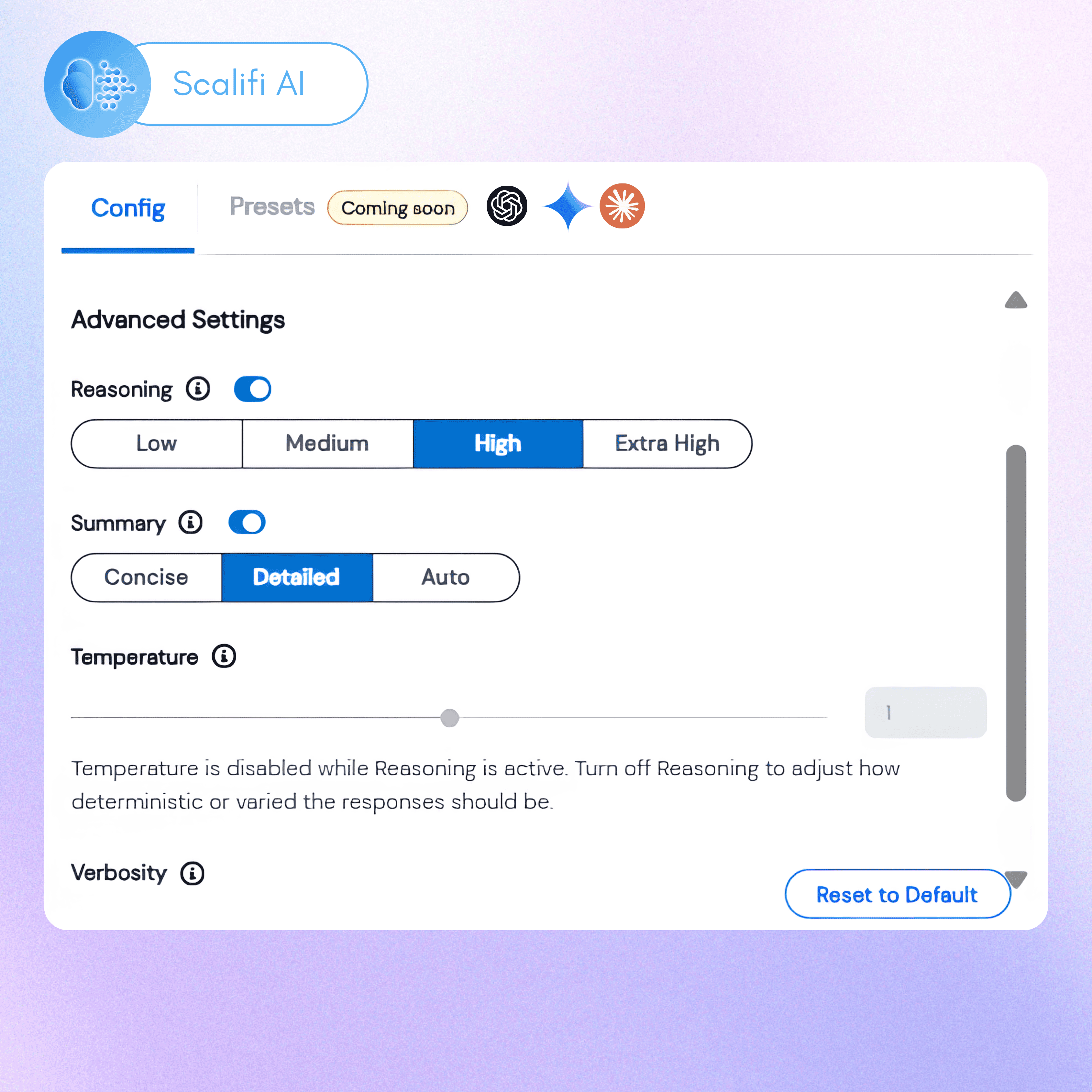
Custom Configuration on Cognis Ai
This week, we’ve added new LLMs, including GPT 5.1, GPT 5.2, Gemini 3 Pro, and Gemini 3 Flash. Now you can also use custom configurations to tune your LLMs' responses in terms of reasoning, summary, temperature, and verbosity.
Why Does Custom Configuration Matter?
Across recent interactions we discovered a need for optimizing model and token usage across LLMs. While newer models like Gemini 3 Pro and GPT 5.2 outperform predecessors on benchmarks, the ability to expend all reasoning capabilities of such powerful models, is limited.
When not using custom configuration it leads to:
- Over-usage of reasoning capabilities, which leads to higher latency per response
- Cost inflation due to higher levels of token usage both during reasoning and in generated outputs
This difference is noticeable when executing heavier tasks using LLMs like Claude, Gemini, or GPT. Using custom configuration allows you to bypass these bottlenecks and unlock cost savings of up to 40%, depending on usage type and limits.
How Does Custom Configuration Work?
Custom configuration allows you to edit a model’s internal tuning across six key areas:
1. Response Mode: Allows you to control how an LLM shapes its responses. You can change it across the following levels to achieve higher levels of precision or expressiveness:
- Focused: Concise, direct, and highly deterministic answers.
- Accurate: Prioritizes clarity and correctness with balanced detail.
- Balanced: Natural and well-rounded responses, most suitable when executing tasks using LLMs.
- Imaginative: Expressive, creative, and exploratory responses fit for brainstorming.
Custom Configuration on Cognis - Response Modes
2. Reasoning: Controls the level of internal reasoning effort expended by a model before answering any query. The two levels of reasoning, as follows, are best suited to handle particular scenarios:
- Low: Best for low-level single-step tasks such as simple content generation or linear data analysis.
- High: Best for multi-step tasks such as financial forecasting, heavy content generation, etc. Latency in this setting is generally higher due to the incremental number of reasoning cycles, depending on the complexity of tasks.
3. Summary: This feature tracks the internal reasoning of models. You can switch it on or off depending on the level of tasks that you assign to an LLM agent. We recommend keeping it turned on for complex multi-step tasks, allowing you to interrupt the model if it takes wrong steps.
4. Temperature: The temperature of a model varies between 0.0 and 2, as shown in the image below, with 0.0 being the most deterministic response level and 2 being the most creative and diverse response level.
Advanced Configurations for LLMs in Cognis Ai
You can adjust the model temperature depending on the kind of task you’re undertaking. For instance, creative tasks like writing blogs tend to work better with temperatures above 1, while technical writing tasks work better with temperatures below 1.
5. Verbosity: Controls the level of detail the model includes in its responses. It has three levels depending on the length of output that you want:
- Low: Produces short and concise answers.
- Medium: Produces average responses as you get on native LLM interfaces.
- Balanced: Natural and well-rounded responses, most suitable when executing tasks using LLMs.
- High: Produces longer, more detailed answers. Best suited for long-format content or report generation.
6. Thinking Budget*: This feature is only available for Gemini 2.5 Pro and governs how much internal planning the LLM performs before it begins generating a response. 128 is the lowest thinking budget, and 32,768 is the highest thinking budget available.
New Models on Cognis Ai and Custom Configuration
The new LLM models added to Cognis Ai include:
- GPT 5.2
- GPT 5.1
- Gemini 3 Pro
- Gemini 3 Flash
With the latest addition of models and the introduction of custom configuration, you can now optimize your token usage to spend less on task execution via LLMs on Cognis Ai.
While custom configuration amongst models is pretty much standardized, they can vary by model generation. Below is a table for reference on the capabilities of each model.
Experience How LLM Configuration Works on Cognis AI (Arcade)
Getting Started
You can Get Started for free today with Cognis Ai’s Community Plan. Please visit Cognis Ai and click on Get Started to begin your journey.
Once you enter Cognis, you can use the quick setup to activate the popular LLMs in your account. Further, you can also configure more LLMs from the ‘Explore LLMs’ tab on the bottom left.
Our Commitment to Human-AI Collaboration
With Cognis Ai, we focus on developing a complementary AI system that helps you derive tangible results from AI. Our ethos while building Cognis is to advance the state of Human-AI collaboration to help people execute faster, remove redundancies, and focus on meaningful work that moves the needle forward. Our future roadmap intends to add features, integrations, and tools that help reduce the noise surrounding AI and focus on outcomes.
For updates, follow us on LinkedIn.
Frequently Asked Questions
Cognis is a workflow automation platform and AI chat assistant built to simplify your worklife. It uses Agentic AI and intelligent agents to automate repetitive tasks, create complete workflows, and act as your artificial intelligence personal assistant. With features like intuitive UI, near-zero hallucination for LLMs, and support for multiple AI models, Cognis combines the best of AI and automation into a single interface.
Custom configuration is a set of parameters that you can tweak to change an LLMs behaviour according to your requirement. There are 6 settings that you can change across all models: Response Mode, Reasoning, Summary, Temperature, Verbosity, and Thinking Budget. For every model you can adjust a few of these settings to get the desired response type. Refer to the table above to check the settings that are available for each model.
Custom configuration is primarily useful because it helps you optimize your token usage. For example, if you're using a larger model like GPT 5.2 for menial tasks without custom configuration, you'll end up spending more because it might overthink the task at hand. Alternatively, it may also generate a longer response when not needed. This results in higher token usage. With custom configuration, you can turn on lower reasoning and verbosity settings to avoid such situations and optimize cost.
You can use multiple LLMs inside Cognis AI. The platform is designed as a multi-LLM orchestration layer, so you’re not locked into one provider. Supported LLMs include OpenAI models (GPT-5, GPT-4o, GPT-4 Turbo, GPT-3.5 series, o-mini family). Anthropic Claude models (Claude 3.5 Sonnet, Claude 3 Opus, Claude 3 Haiku) Google Gemini models (Gemini 1.5 Pro, Gemini 1.5 Flash), DeepSeek (latest V3 and V3.1 reasoning models) and more models to be added soon.
Most AI apps or automation apps are single-function. Cognis combines AI chat, agent software, and workflow automation platform capabilities in one. Instead of juggling multiple AI programs or AI tools free/paid, you get one artificial intelligence app where agentic AI manages context, memory, and execution/
Indie Builders who hate administrative work. Startups with small teams and big dreams. Professionals needing a chatgpt AI assistant or artificial intelligence personal assistant. Developers who want to create an AI or experiment with AI programs in one place. Enterprises wanting to level up by automating workflows without the hassle of 2 AM 'nothing's working with the other' calls.
Yes. Cognis includes monitoring to reduce AI bias across Chat GPT-4, Chat GPT-3.5, and other best AI models. It helps ensure fair, transparent outputs when you use it as your AI assistant or automation app.
External References
- Cognis Ai (Beta) is live now. Explore the power of a Multi-LLM Agentic Ai platform that reduces your work time by 5x. Read the Launch Note.
- Explore the power of Multi-LLM Agentic Ai
Annoucements
Contact Us
Fill up the form and our team will get back to you within 24 hrs